
How to Create a Waiver
Having parents sign waivers during registration is important because it helps protect your organization. You can create online waivers for parents to acknowledge during registration in just a few steps.
✏️ How to Create a Waiver
- Navigate to your Programs page and begin creating a new program
- Fill out your basic information, set pricing, and proceed to Step 3
- On the Additional Questions section, click + Add New Question
- From the dropdown, select Waiver as your question type
- Enter in the question text which will link to the waiver (Ex: Click here to view our liability waiver)
- Add your waiver details by either uploading a PDF version of your waiver OR copy and paste your waiver directly text into the box
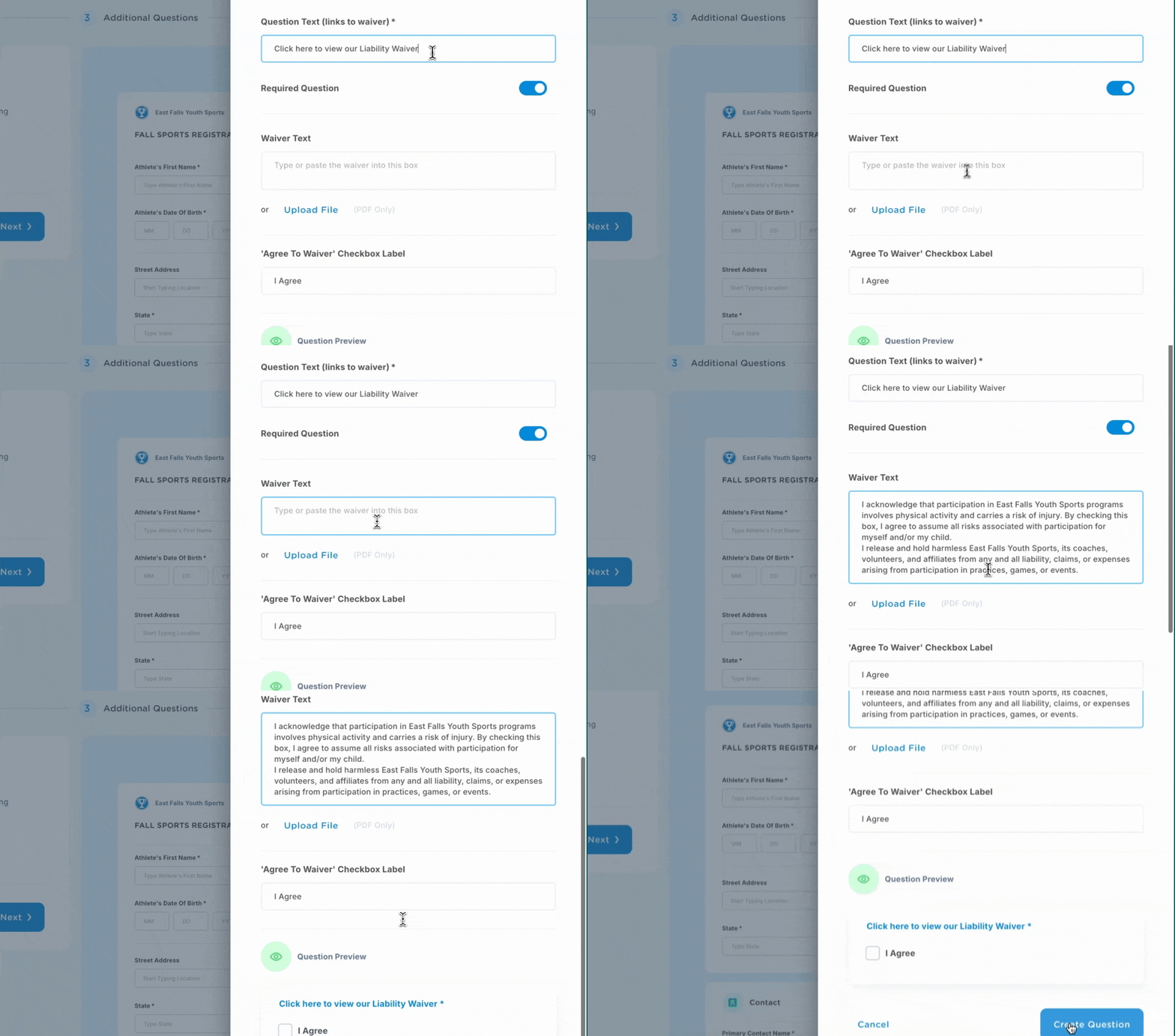
What Participants Will See During Registration
Registrants will be able to click to view your full waiver and acknowledge their understanding through a checkbox agreement.

Additional Resources
Our blog post details out the most common types of sports waivers and provides a template for you to use to create your own waivers > How to Create a Waiver for Youth Sports (+Free Template)
You can also view our post about contracts for players, parents and coaches: A Guide to Youth Sports Contracts